


Pick Up Limes
4.998.00 Reviews
App Specs
- Version
- 2.0.0
- Updated On
- License
- Free
- Downloads
- 50,000+
- Developer
- Pick Up Limes
- Categories
- Food & Drink
- Platform
- Android, iOS
Screenshots
 Analysis by AppCompare
When I try a new food app, I want to know quickly whether it will help me decide what to cook or simply give me another place to browse. Pick Up Limes is aimed at people interested in plant-based eating, with recipes alongside broader wellbeing content. I found it most useful when I treated it as a source of ideas and a planning aid, rather than expecting it to replace every recipe site, grocery list, or nutrition tool I already use.
Where people can get stuck
The first hurdle is choosing a starting point. A collection of recipes can feel inviting and still leave you wondering what to make tonight, especially if you have a particular ingredient to use or a short window to cook. I found it helps to begin with the meal you need, then narrow my browsing by the kind of dish I actually want, rather than scrolling without a plan. That simple change turns inspiration into a decision.
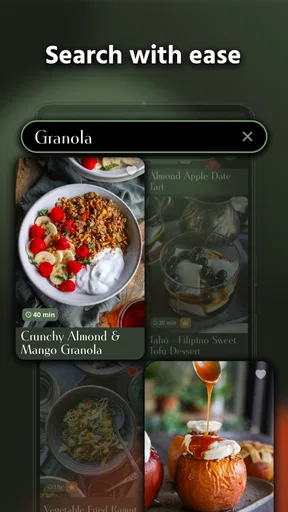
Search and discovery are not always as effortless as they are in a dedicated recipe database. The original experience I had included moments when a specific dish took more hunting than I expected. If you remember a recipe but not its exact title, try searching with a distinctive ingredient or the type of meal instead of a broad term. If browsing still does not surface it, moving on to a nearby recipe is often more useful than spending your whole cooking window looking.
There is also a difference between reading a recipe and being ready to cook it. Ingredients that seem ordinary on screen may be unfamiliar, unavailable in your usual shop, or more expensive than you want to spend. Before committing, I check the full ingredient list and read the method through once. That quick scan helps me spot a dish that needs more preparation or a pantry item I do not have, before I have already started chopping.
Getting set up for a useful first week
The app is free to download and is developed by Pick Up Limes. It is listed in Food & Drink, is rated for Everyone, and has a five-star average from around 1,200 ratings, with more than 50,000 installs. It first appeared in October 2023, and version 1.11.2 is the current version. It requires Android 6.0 or later, so I would check that before troubleshooting a failed installation on an older device. Optional in-app purchases range from $5.49 to $39.99 per item, which is worth keeping in mind if you are exploring beyond the free material.
For a fair test, I would not try to overhaul every meal at once. I would choose two or three dishes that fit my normal week, make sure their ingredients overlap where practical, and use the meal planner to place them on days when I have time to cook. This is a more realistic trial than selecting a different ambitious recipe for every night. It also shows whether the app’s style suits your routine, not just whether one appealing photo catches your eye.
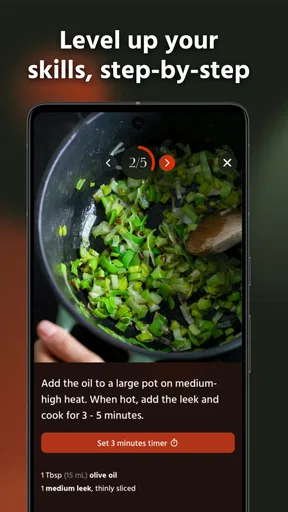
If you are new to plant-based cooking, treat the first recipe as a lesson in your own kitchen rather than a test of skill. Read the method before beginning, set out ingredients, and note which steps take longer than expected. Afterward, you will know whether that dish belongs in a quick weekday rotation or is better saved for a slower evening. Experienced cooks can use the same approach to judge whether a recipe is flexible enough to adapt to what is already in the fridge.
Worth Reading Before You Choose

Flipboard Shows What News Apps Must Do Beyond the Feed

Switching to Android Auto Means Rethinking Your Driving Routine

Google Calendar Makes a Crowded Week Easier to Manage

Ludo King Makes the Most of the Minutes Between Plans

Baby Panda World Brings Quick Play to Modern Phones, but Its Game Library Feels Busy

ESPN’s Live Game View Makes Following Close Games Easier
Making the app work with everyday cooking
I use the app most effectively when I let a real cooking decision guide what I open next: what needs using, how much time I have, and whether I want a full recipe or broader inspiration. That keeps browsing purposeful and makes the planner easier to fit around an ordinary week. In the next section, I’ll focus on turning those ideas into a meal without making the process feel like another chore.
A practical recipe-to-table workflow
One useful way to use the planner is to work backward from your calendar. If you know a busy evening is coming, choose a recipe that feels manageable for that day, then reserve a more involved dish for when you have room to enjoy the process. I also look for chances to reuse ingredients across meals. That does not mean forcing every recipe into the same flavor profile; it means avoiding a plan that leaves me with several half-used items and no idea what to do with them.
For example, imagine it is late afternoon, you have a few vegetables at home, and you still need to decide on dinner. I would check a recipe’s ingredient list first, compare it with what is already available, then read the steps to see whether the timing suits the evening. If the match is poor, I would choose another dish before starting. That small pause is more reliable than discovering halfway through that the recipe calls for something I cannot replace easily.
When a dish works, I make a mental note of why: the ingredients were easy to find, the instructions were comfortable to follow, or the leftovers fit lunch the next day. Those details are more useful than simply saving every attractive recipe. Over time, a short personal shortlist makes the app feel less like an endless catalogue and more like a practical companion for meals I can genuinely see myself making again.
Planning, inspiration, and the alternatives
The meal planner is most valuable when it helps answer a concrete question: what am I eating on the days when I usually get stuck? I would use it to map out a few meals, not as a promise to follow a perfect weekly schedule. Plans change, and a recipe selected on Sunday can become inconvenient by Wednesday. Leaving room to swap a meal is a sensible trade-off; the planner should reduce decision fatigue, not create guilt when the week takes a turn.
Compared with general recipe websites, this app brings plant-based dishes and wellbeing material together in one place, which gives it a more focused feel. A broad cooking site may be better if you want recipes across many dietary styles or a very large range of cuisines. A basic notes app or paper list may be quicker if all you need is to remember three dinners and a shopping list. I see this app as the better fit when you want plant-based inspiration and planning in the same setting, not when you only need a bare-bones organizer.
The wider articles and videos can add context when you want to explore habits beyond cooking, but they are not essential to getting value from the recipes. I would approach them selectively: choose a topic that genuinely interests you rather than feeling obliged to consume everything. That keeps the app useful for someone who mainly wants dinner ideas, while leaving room for people who enjoy a broader lifestyle resource.
Recovering when a plan or recipe does not fit
If a recipe search is proving frustrating, I would first simplify the search rather than assume something is broken. Try a key ingredient or a dish type, then browse related ideas if the exact match remains elusive. If a recipe is unsuitable because of one missing ingredient, decide whether it is central to the dish before improvising. Replacing a defining ingredient can change the result far more than skipping a garnish, and the app cannot make that kitchen judgment for you.
If your planned meal no longer fits the day, change the plan instead of forcing it. Move the more involved recipe to a day with more time and choose something that better suits the ingredients and energy you have now. The planner is there to support your routine; it is not a timer or a guarantee that every meal will go smoothly. I find that separating “I planned this” from “I must cook this tonight” makes meal planning much easier to maintain.
For installation trouble, check that the device meets the Android 6.0 minimum and that the store account and connection are working normally before trying more complicated fixes. If content or a purchase is not behaving as expected, first reopen the app and check the relevant store account before repeating a payment attempt. These are basic checks, not a claim that every issue has the same cause; if a problem continues, the app’s support route is the sensible next step.
When another tool is the better choice
This is not the right fit for everyone. If you want a general-purpose recipe library with equal attention to meat, fish, and plant-based meals, a broader food app will give you a more natural starting point. If you already have a settled meal-planning system and only need a grocery checklist, adding another app may create more maintenance than value. And if your priority is precise dietary management, I would not treat recipe information as a substitute for advice tailored to your needs.
It may also feel less rewarding if you prefer to cook entirely by instinct and do not want to browse articles, follow written steps, or plan meals in advance. On the other hand, people who are curious about plant-based meals but unsure how to make them fit ordinary weekdays may appreciate having recipes and planning close together. The key question is not whether the app contains appealing ideas; it is whether its style of guidance matches the way you actually decide what to eat.
First impressions and the recipe collection
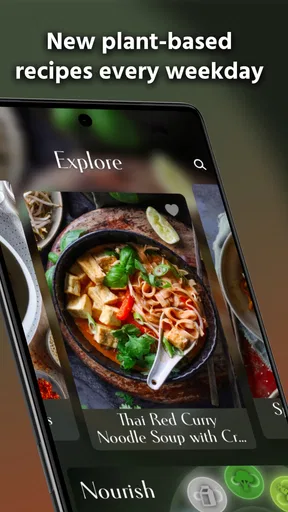
Okay, so let’s dive right in. The moment I launched Pick Up Limes, I was greeted with a sleek and calming interface. The design is minimalist, yet vibrant, perfectly mirroring the content it offers. It’s like they’ve managed to capture the essence of simplicity and elegance in an app. Navigating through it felt intuitive, almost as if it was tailored just for me!
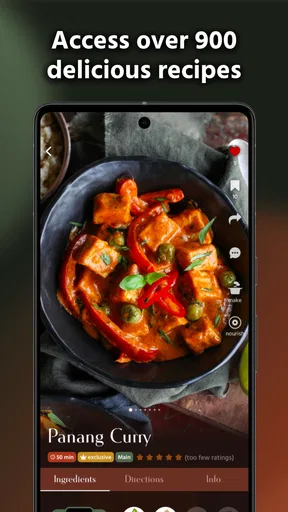
If you’ve ever been on the hunt for plant-based recipes, you know how daunting it can be to find something that’s both easy to make and delicious. But fear not! This app has a treasure trove of recipes that cater to beginners and seasoned plant-based aficionados alike. From hearty breakfasts to delightful desserts, it’s like having a personal chef right in your pocket.
What truly stands out is the detailed breakdown of each recipe. You get a clear list of ingredients, step-by-step instructions, and even nutritional information. It’s like they’ve thought of everything to make cooking as seamless as possible. Plus, the photos are downright drool-worthy!
Beyond the recipes
Pick Up Limes isn’t just about food. It’s an entire lifestyle app. You’ll find a plethora of articles and videos on wellness, mindfulness, and sustainable living. It’s like having a guide to leading a more balanced and fulfilling life. The articles are insightful, and the videos are engaging, making complex topics feel accessible.
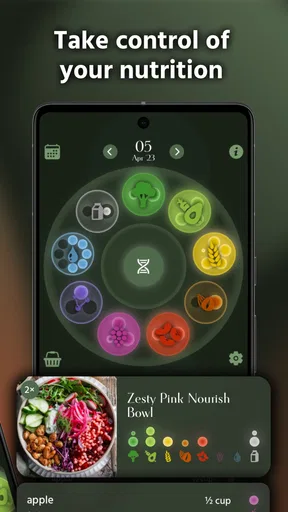
One feature I particularly enjoyed was the meal planner. It’s perfect for those who like to plan their meals ahead of time. You can select recipes from the app and slot them into your weekly planner. It’s a great way to stay organized and ensure you’re eating a variety of nourishing meals.
Cooking a couple of dishes
Now, let’s talk about my personal experience. I decided to try out a couple of recipes over the weekend. The process was straightforward, and the results were, quite frankly, delicious. I felt a sense of accomplishment knowing I was eating something healthy and delightful.
One recipe, in particular, a creamy mushroom risotto, was a hit at my dinner table. Even my friends, who aren’t strictly plant-based, couldn’t stop raving about it. It’s moments like these that make the app feel invaluable.
Where it could improve
No app is perfect, and that includes Pick Up Limes. While the app is packed with fantastic content, there were moments when I wished for a search function that was a tad more intuitive. Sometimes finding a specific recipe felt a bit like a treasure hunt.
Additionally, while the app is free, some content is locked behind a premium subscription. I get it, good content comes at a price, but a little more free content would be a nice touch for new users who want to explore before committing.
My verdict
Overall, diving into Pick Up Limes has been a delightful experience. It’s an app that not only inspires you to eat plant-based but also encourages a holistic approach to wellbeing. Whether you’re a veteran in the vegan world or a curious newcomer, this app has something for everyone.
So, would I recommend it? Absolutely! It’s like having a friendly guide by your side, helping you navigate the flavors and nuances of plant-based living. If you’re ready to embark on a delicious and healthy journey, give Pick Up Limes a try. Happy cooking!
Pros
- User-friendly interface for easy navigation.
- Wide variety of healthy recipes available.
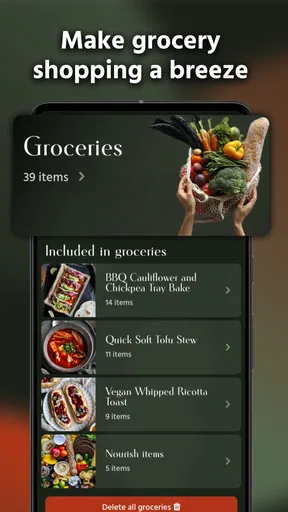
- Interactive grocery list feature.
- Customizable meal plans to suit dietary needs.
- Regular updates with new content.
Cons
- Requires internet for most features.
- Limited offline access to recipes.
- Some features behind a paywall.
- Notifications can be overwhelming.
- No integration with fitness apps.
FAQs for Pick Up Limes
What is Pick Up Limes and what does it offer?
Pick Up Limes is a lifestyle app designed to aid users in adopting a plant-based diet. It offers a variety of features including recipes, meal planning, and nutrition tips. The app aims to make plant-based living accessible and enjoyable, with a focus on wellness and sustainability.
Is Pick Up Limes suitable for beginners in plant-based eating?
Yes, Pick Up Limes is ideal for beginners. It provides easy-to-follow recipes and comprehensive meal plans. The app also offers educational content about plant-based nutrition, making it a great starting point for those new to this lifestyle.
Does Pick Up Limes require a subscription for full access?
Pick Up Limes offers both free and premium content. While many features are available for free, a subscription unlocks exclusive recipes, personalized meal plans, and advanced nutrition guides. This ensures users have access to a wider array of resources.
How can Pick Up Limes help with meal planning and grocery shopping?
The app includes a meal planning tool that helps organize meals for the week. It also generates a shopping list based on selected recipes, streamlining the grocery shopping process. This feature saves time and reduces food waste by ensuring you buy only what’s needed.
Is Pick Up Limes available on both Android and iOS devices?
Yes, Pick Up Limes is available for download on both Android and iOS platforms. Users can easily access the app through the Google Play Store or the Apple App Store, ensuring compatibility with a wide range of devices.


